API Key 없이 OAuth로 Nano Banana 2 대량 생성
agy Google OAuth 세션으로 Nano Banana 2(gemini-3.1-flash-image) 이미지를 배치로 만들고, (선택) Papermint 공개 URL과 Pinterest bulk CSV까지 이어갑니다. 화면·메뉴·가격을 지어내지 않습니다.
SOURCE A user paste 2026-09-24 · Papermint Pinterest skill · 공개 도메인 papermint.moonlang.com
- 1. 왜 OAuth인가
- 2. 파이프라인
- 3. 준비물
- 4. 프로젝트 뼈대
- 5. designs.json
- 6. generate-oauth.mjs 전체
- 7. 실행
- 8. 프롬프트 팁
- 9. FAQ
- 10. 부록 · Papermint Pinterest
1. 왜 OAuth인가
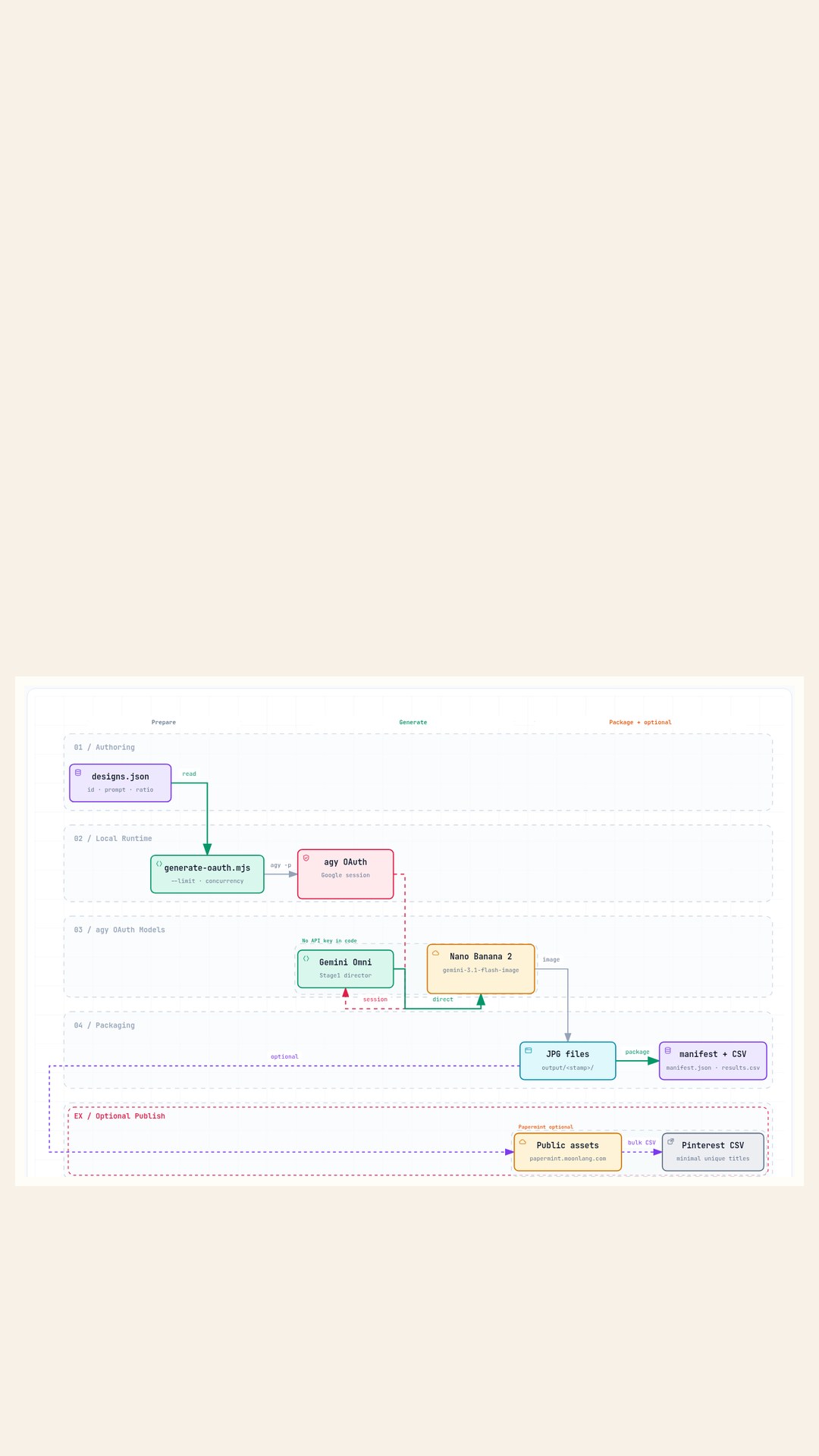
원문이 말하는 API Key 부담은 세 가지입니다. 카드 등록·과금 리스크, GitHub에 Key가 새는 사고, 무료 티어 rate limit입니다. agy(Antigravity CLI)는 Google 로그인 세션을 쓰고, 코드에 비밀번호나 API Key 문자열을 넣지 않습니다. 이미지 경로는 Gemini Omni(디렉터) → Nano Banana 2 이미지 엔진입니다.
2. 파이프라인
원문 Mermaid는 Archify로만 옮겼습니다. 최종 산출에 Mermaid를 넣지 않습니다.
3. 준비물
- Node.js v18+ —
node -v - agy CLI —
agy --help. 첫 실행에서 Google 로그인 - 세션 스모크:
agy -p "Reply with OK" --dangerously-skip-permissions - (선택·나중에) Papermint 저장소
ai-stationery-generator경로
4. 프로젝트 뼈대
mkdir gemini-image-batch && cd gemini-image-batch
npm init -y
package.json에 "type": "module"을 넣고, 스크립트 "generate": "node generate-oauth.mjs"를 둡니다. 샘플 파일은 이 팩의 _src/에서 복사하세요.
mkdir -p data output
cp /path/to/oauth-nano-banana-batch/_src/designs.json data/designs.json
cp /path/to/oauth-nano-banana-batch/_src/generate-oauth.mjs ./generate-oauth.mjs
5. designs.json
필드: id, title, prompt, textPosition, aspectRatio(원문 예: 3:4 또는 2:3). 샘플 id: herbarium-fern-01, cafe-croissant-02, vintage-rose-03.
[
  {
    "id": "herbarium-fern-01",
    "title": "Herbarium Fern Study",
    "prompt": "Pressed fern specimen on cream watercolor paper, soft botanical herbarium style, delicate fronds, generous blank writing space on the right third, warm paper texture, natural window light, no text, no labels, no watermark",
    "textPosition": "right",
    "aspectRatio": "3:4"
  },
  {
    "id": "cafe-croissant-02",
    "title": "Cafe Croissant Morning",
    "prompt": "Flaky croissant on a small ceramic plate beside a coffee cup, cozy cafe table, linen napkin, soft morning side light, paper texture backdrop with blank writing band at bottom, no text, no logo, no watermark",
    "textPosition": "bottom",
    "aspectRatio": "2:3"
  },
  {
    "id": "vintage-rose-03",
    "title": "Vintage Rose Postcard",
    "prompt": "Single vintage rose on aged cream postcard paper, gentle film grain, soft pastel tones, blank writing rectangle on the left, quiet studio light, no text, no calligraphy, no watermark",
    "textPosition": "left",
    "aspectRatio": "3:4"
  }
]
6. generate-oauth.mjs 전체
원문 대화의 코드 블록이 팩 브리프에 완전 형태로 남아 있지 않아, SOURCE.md 파이프라인·옵션·산출물 계약을 기준으로 들여쓰기를 복원해 두었습니다. 동작 계약: --input --limit --output --concurrency(1~2), 출력 output/<timestamp>/의 jpg · manifest.json · results.csv.
#!/usr/bin/env node
/**
 * generate-oauth.mjs
 * SOURCE: user paste 2026-09-24 (reconstructed from SOURCE.md pipeline when
 * verbatim block was incomplete in the pack brief). Uses agy Google OAuth
 * session — no GEMINI_API_KEY in this file.
 *
 * Stage1: Gemini Omni (director prompt) via agy
 * Stage2: Nano Banana 2 (gemini-3.1-flash-image) via agy generate_image tool
 *
 * Usage:
 *   node generate-oauth.mjs --input data/designs.json --limit 3
 *   node generate-oauth.mjs --input data/designs.json --limit 50 --concurrency 1
 *
 * Options: --input --limit --output --concurrency (prefer 1~2)
 * Outputs under output/<timestamp>/ : *.jpg, manifest.json, results.csv
 */

import fs from "node:fs";
import path from "node:path";
import { spawnSync } from "node:child_process";
import { fileURLToPath } from "node:url";

const __dirname = path.dirname(fileURLToPath(import.meta.url));

function parseArgs(argv) {
  const out = {
    input: "data/designs.json",
    limit: Infinity,
    output: null,
    concurrency: 1,
  };
  for (let i = 2; i < argv.length; i++) {
    const a = argv[i];
    if (a === "--input") out.input = argv[++i];
    else if (a === "--limit") out.limit = Number(argv[++i]);
    else if (a === "--output") out.output = argv[++i];
    else if (a === "--concurrency") out.concurrency = Math.max(1, Number(argv[++i]) || 1);
    else if (a === "--help" || a === "-h") {
      console.log(`Usage: node generate-oauth.mjs --input data/designs.json --limit 3 [--output DIR] [--concurrency 1|2]`);
      process.exit(0);
    }
  }
  if (!Number.isFinite(out.limit) || out.limit < 1) out.limit = Infinity;
  if (out.concurrency > 2) {
    console.warn("[warn] SOURCE recommends concurrency 1~2. Clamping to 2.");
    out.concurrency = 2;
  }
  return out;
}

function stamp() {
  const d = new Date();
  const p = (n) => String(n).padStart(2, "0");
  return (
    d.getFullYear() +
    p(d.getMonth() + 1) +
    p(d.getDate()) +
    "-" +
    p(d.getHours()) +
    p(d.getMinutes()) +
    p(d.getSeconds())
  );
}

function ensureDir(p) {
  fs.mkdirSync(p, { recursive: true });
}

function loadDesigns(inputPath) {
  const abs = path.resolve(inputPath);
  if (!fs.existsSync(abs)) throw new Error("input not found: " + abs);
  const raw = JSON.parse(fs.readFileSync(abs, "utf8"));
  const list = Array.isArray(raw) ? raw : raw.designs || raw.items || [];
  if (!list.length) throw new Error("no designs in " + abs);
  return list;
}

function buildAgyPrompt(design, jpgAbs) {
  const ratio = design.aspectRatio || "3:4";
  const textPos = design.textPosition || "center";
  // Stage1 director (Omni) + Stage2 Nano Banana 2 image engine
  return [
    "You are Gemini Omni acting as an art director for stationery image generation.",
    "Then call the built-in generate_image tool exactly once.",
    `Model preference: Nano Banana 2 / gemini-3.1-flash-image.`,
    `Aspect ratio: ${ratio}.`,
    `Leave blank writing space toward: ${textPos}.`,
    "Do not render any readable text, logos, watermarks, or UI chrome in the image.",
    "Save the final JPEG to this absolute path (overwrite ok):",
    jpgAbs,
    "",
    "Subject prompt:",
    design.prompt,
  ].join("\n");
}

function findNewestImage(roots, afterMs) {
  let best = null;
  let bestM = 0;
  for (const root of roots) {
    if (!root || !fs.existsSync(root)) continue;
    const stack = [root];
    while (stack.length) {
      const cur = stack.pop();
      let ents = [];
      try {
        ents = fs.readdirSync(cur, { withFileTypes: true });
      } catch {
        continue;
      }
      for (const e of ents) {
        const p = path.join(cur, e.name);
        if (e.isDirectory()) {
          if (e.name === "node_modules" || e.name === ".git") continue;
          stack.push(p);
        } else if (/\.(jpe?g|png|webp)$/i.test(e.name)) {
          try {
            const st = fs.statSync(p);
            if (st.mtimeMs >= afterMs - 2000 && st.mtimeMs >= bestM) {
              bestM = st.mtimeMs;
              best = p;
            }
          } catch {}
        }
      }
    }
  }
  return best;
}

function runAgy(prompt) {
  const r = spawnSync(
    "agy",
    ["-p", prompt, "--dangerously-skip-permissions"],
    {
      encoding: "utf8",
      maxBuffer: 20 * 1024 * 1024,
      env: process.env,
      timeout: 1000 * 60 * 8,
    }
  );
  return {
    status: r.status,
    error: r.error ? String(r.error.message || r.error) : null,
    stdout: r.stdout || "",
    stderr: r.stderr || "",
  };
}

function csvEscape(s) {
  const t = String(s ?? "");
  if (/[",\n]/.test(t)) return `"${t.replace(/"/g, '""')}"`;
  return t;
}

async function mapPool(items, concurrency, fn) {
  const results = new Array(items.length);
  let i = 0;
  async function worker() {
    while (i < items.length) {
      const idx = i++;
      results[idx] = await fn(items[idx], idx);
    }
  }
  const n = Math.min(concurrency, items.length || 1);
  await Promise.all(Array.from({ length: n }, () => worker()));
  return results;
}

async function main() {
  const args = parseArgs(process.argv);
  const designsAll = loadDesigns(args.input);
  const designs = designsAll.slice(0, Number.isFinite(args.limit) ? args.limit : designsAll.length);

  const outRoot = path.resolve(args.output || path.join("output", stamp()));
  ensureDir(outRoot);

  const home = process.env.HOME || process.env.USERPROFILE || "";
  const brainRoots = [
    path.join(home, ".gemini", "antigravity-cli", "brain"),
    path.join(home, ".agy", "brain"),
  ];

  console.log(`[start] designs=${designs.length} concurrency=${args.concurrency} out=${outRoot}`);

  const rows = await mapPool(designs, args.concurrency, async (design) => {
    const id = design.id || `item-${Date.now()}`;
    const jpgAbs = path.join(outRoot, `${id}.jpg`);
    const started = Date.now();
    const prompt = buildAgyPrompt(design, jpgAbs);
    console.log(`[run] ${id}`);

    const agy = runAgy(prompt);
    let status = "ok";
    let note = "";
    let sourcePath = null;

    if (agy.error) {
      status = "failed";
      note = agy.error;
    } else if (agy.status !== 0) {
      status = "failed";
      note = `agy_exit_${agy.status}: ${(agy.stderr || agy.stdout).slice(0, 240)}`;
    }

    if (fs.existsSync(jpgAbs) && fs.statSync(jpgAbs).size > 0) {
      sourcePath = jpgAbs;
    } else {
      const found = findNewestImage(brainRoots.concat([outRoot]), started);
      if (found) {
        try {
          // convert/copy to jpg target without inventing heavy deps — copy bytes
          fs.copyFileSync(found, jpgAbs);
          sourcePath = found;
          if (status === "failed") {
            status = "ok";
            note = "recovered_from_brain";
          }
        } catch (e) {
          status = "failed";
          note = String(e.message || e);
        }
      } else if (status === "ok") {
        status = "failed";
        note = "no_image_written";
      }
    }

    const row = {
      id,
      title: design.title || "",
      status,
      file: status === "ok" ? path.basename(jpgAbs) : "",
      aspectRatio: design.aspectRatio || "",
      textPosition: design.textPosition || "",
      ms: Date.now() - started,
      note,
      sourcePath: sourcePath || "",
    };
    console.log(`[${status}] ${id} ${row.ms}ms ${row.note || row.file}`);
    return row;
  });

  const manifest = {
    createdAt: new Date().toISOString(),
    input: path.resolve(args.input),
    output: outRoot,
    concurrency: args.concurrency,
    model: "gemini-3.1-flash-image (Nano Banana 2 via agy OAuth)",
    auth: "agy Google OAuth session (no API key in script)",
    total: rows.length,
    ok: rows.filter((r) => r.status === "ok").length,
    failed: rows.filter((r) => r.status === "failed").length,
    items: rows,
  };
  fs.writeFileSync(path.join(outRoot, "manifest.json"), JSON.stringify(manifest, null, 2));

  const header = ["id", "title", "status", "file", "aspectRatio", "textPosition", "ms", "note"];
  const csv = [
    header.join(","),
    ...rows.map((r) => header.map((h) => csvEscape(r[h])).join(",")),
  ].join("\n");
  fs.writeFileSync(path.join(outRoot, "results.csv"), csv + "\n");

  console.log(`[done] ok=${manifest.ok} failed=${manifest.failed} → ${outRoot}`);
  console.log(`       manifest.json  results.csv`);
  if (manifest.failed) process.exitCode = 1;
}

main().catch((e) => {
  console.error("[fatal]", e.message || e);
  process.exit(1);
});
7. 실행
스모크 3장
node generate-oauth.mjs --input data/designs.json --limit 3
결과 확인
output/<timestamp>/ 아래 jpg, manifest.json, results.csv를 엽니다.
동시성
원문 권장 concurrency는 1~2입니다. 크게 올리면 실패·대기 시간이 늘 수 있습니다.
8. 프롬프트 팁
- 종이 질감(paper texture) 키워드를 넣습니다.
- 조명(lighting)을 짧게 고정합니다.
- 글 올릴 blank writing space 방향을
textPosition과 맞춥니다. - 이미지 안에 읽히는 글자·로고·워터마크를 넣지 말라고 명시합니다.
9. FAQ
- 정말 무료인가요?
- 원문 주장: Antigravity 세션으로 유료 API 토큰 차감·카드 청구 없이 사용. 이 가이드는 단정하지 않고 [확인 필요]로 둡니다.
- 50~100장도 되나요?
- 원문: concurrency 1~2로 50~100 가능, 50장 약 15~20분. 환경마다 다르므로 참고치이며 [확인 필요].
- failed 항목은?
- 재실행하세요. 원문은 자동 1회 재시도를 말하지만, 재구성 스크립트에는 자동 재시도가 없습니다. [확인 필요]
- 시크릿은?
- .env, 토큰, 자격 증명 파일을 커밋하지 마세요.
10. 부록 · Papermint Pinterest (선택)
이미지 생성 이후의 공개·업로드 절만 Papermint skill에서 가져왔습니다. 작업 저장소: ai-stationery-generator. 공개 도메인: https://papermint.moonlang.com.
명령 흐름(요약)
cd ai-stationery-generator
npm test

# Imagine-first (기본) — skill 스크립트
node "$env:USERPROFILE\.grok\skills\papermint-pinterest-workflow\scripts\export-imagine-prompt-plan.mjs" ^
  --input data/pinterest-designs.json --limit 100 --output generated-assets/pinterest/imagine-plan.json
# image_gen으로 맵 작성 후 assemble-imagine-run.mjs
npm run prepare:pinterest-public-assets -- --source <run> --public-root public/pinterest-assets --base-url https://papermint.moonlang.com/pinterest-assets
node .../build-upload-ready.mjs --run <run>
npm run track:pinterest-links -- --run <run> --campaign <campaign_name>
npm run build:pinterest-bulk-csv -- --input public/pinterest-assets/<run-id>/pinterest-upload-ready.csv --output-dir public/pinterest-assets/<run-id>
OpenAI 경로(npm run generate:pinterest-assets -- --provider openai)는 사용자가 명시할 때만. 기본은 Grok Imagine입니다.
최소 unique-title bulk CSV
Title,Media URL,Pinterest board,Thumbnail,Description,Link,Publish date,Keywords
<unique title>,<public jpg url>,Cute Animal Printable Art,,,<utm link>,,
- 설명·키워드·중복 제목·여러 보드를 bulk CSV에 넣지 않습니다.
- 업로드 페이지: https://www.pinterest.com/settings/import-content/
- UTM 예:
utm_source=pinterest,utm_medium=social,utm_campaign=<campaign>,utm_content=<image-id> - 핀마다 AI-generated / AI-modified disclosure 필수
public/pinterest-assets/<run-id>/를 커밋·푸시해 Vercel에 올립니다. .env 시크릿은 커밋하지 않습니다.
- node -v · agy OK 스모크
- designs.json + generate --limit 3
- jpg · manifest.json · results.csv
- (선택) 공개 URL + minimal unique-title CSV + AI disclosure
출처 SOURCE A 2026-09-24 · Papermint Pinterest workflow skill · Archify showcase pipeline · Card Tutorial Architect v3.0 · 카드 · 목록